
Single Task
One autonomous turn, including landing the change. It can still stop and ask you a question.
Best for: Bugs, features and docs with a tangible outcome.
Pre-alpha · desktop app · Apache-2.0
Warmstart is a multi-agent orchestrator for Claude Code, Codex and Antigravity. It routes each task to an agent and model that fit, lets a strong model plan while lighter ones implement in parallel, and keeps every handoff, question and result with the task. Capture the next idea in Scratchpad without breaking your flow.
One board for the work, the decisions, and the cost.
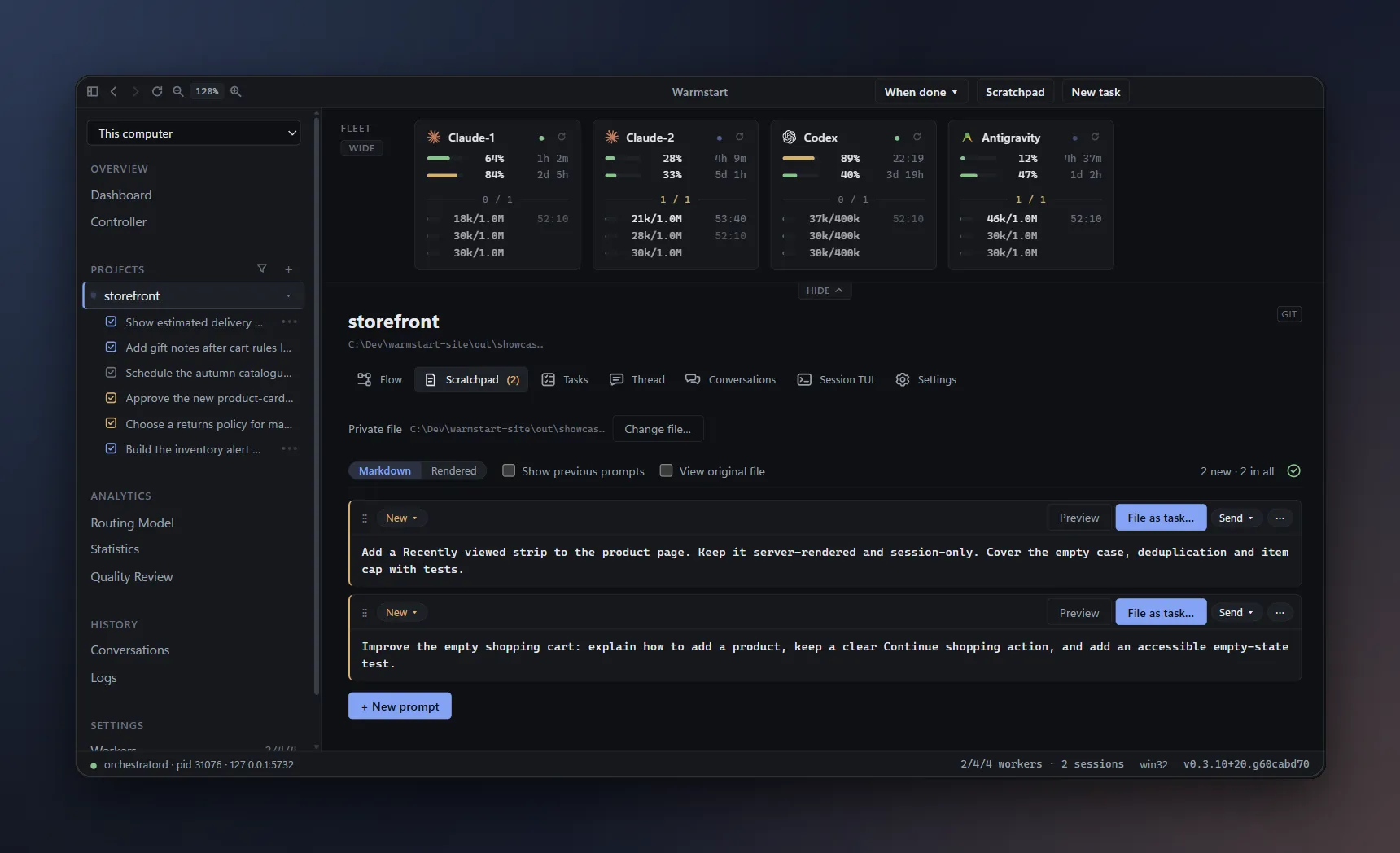
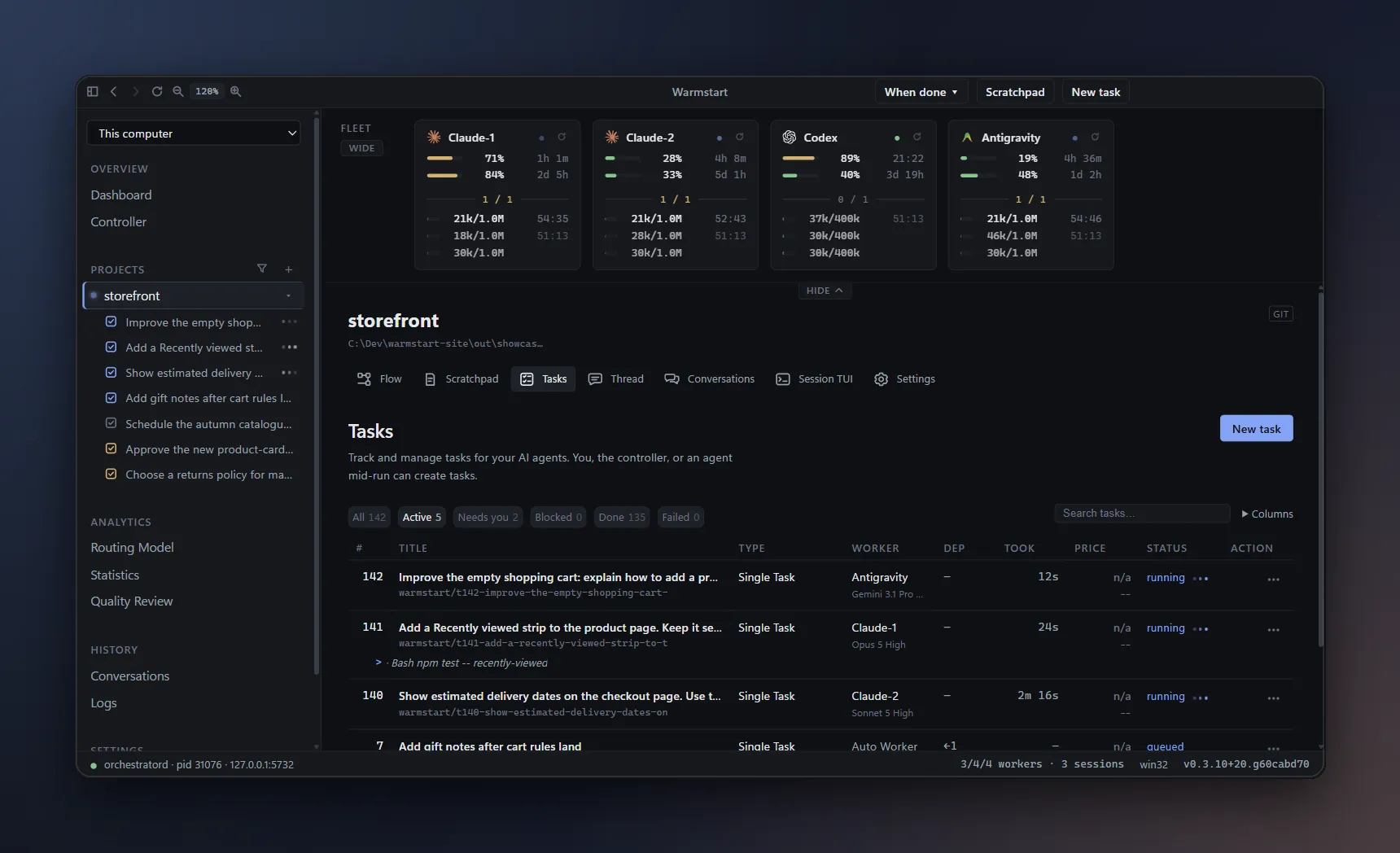
This is Warmstart, a control room for the coding agents you already use. We will follow a storefront project from a quick idea to work that is ready to land. Across the top, the fleet strip shows four accounts: two Claude Code accounts, Codex, and Antigravity. On each card, the upper bar is the five-hour window and the lower bar is the weekly window, each with the time until it resets. Warmstart reads these numbers to decide where work should go. The application is real, but the accounts are invented. The progress, quota readings, prices, and results are staged and illustrative.
Let's start with the most common way to hand off work: a Single Task. New task is always in the top row, and every project page has its own New task button too. I open it from the storefront project. The type menu lists the kinds of work Warmstart can file. A Single Task runs to completion on its own: the agent works in its own checkout, verifies the change, and lands it according to the project's policy, asking me only when it needs a decision. I describe the outcome and the checks, leave the worker on automatic, and file it. Warmstart routes it to Claude-2, the account with the most room in its five-hour window.
The other familiar option is a Conversation. It works like the chat you already know: an open, multi-turn session that pauses after each reply, so I can explore an idea, ask follow-ups, and decide together with the agent. It commits only when I ask. That suits open questions, such as how to approach a slow page before deciding what to change. A Single Task is better when the outcome is clear. It does not wait for me after every turn, it works on its own branch, and it reports back through its status. That matters most when several tasks are running at once. Instead of keeping a chat window open for each one, I watch one board, and step in only when a task needs me.
While tasks are running, ideas keep arriving. A random thought, like a recently viewed strip for product pages, pops up in the middle of other work. If I start a task or a conversation right away, I break my focus and interrupt the work in progress. If I don't write it down, it is gone. Scratchpad is the project's notepad for exactly this moment. I open it and add a prompt for recently viewed products, with the outcome, constraints, and checks. Then I add a separate note for the empty shopping cart. Notes are ordinary Markdown, saved in a file in the project. Later, I can refine a note, switch to the rendered view, and file it as a task, or send it to a conversation, when I am ready.
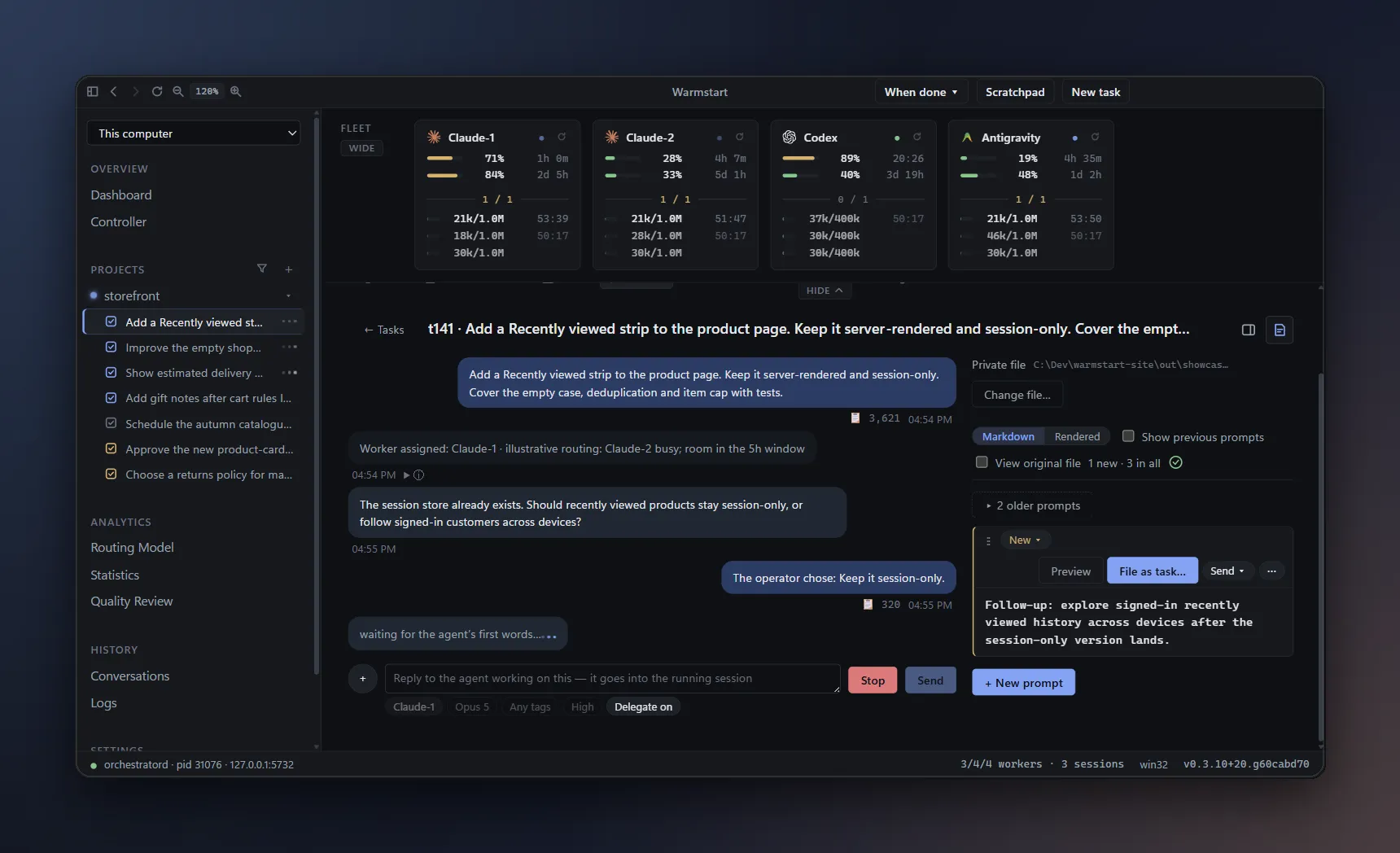
The recently viewed idea is now concrete enough to file. From its card, I choose File as task. The composer opens with the note already in it, as a Single Task. I review the settings and file it. Claude-2 is busy, so Warmstart routes it to Claude-1, which still has room in its five-hour window. After filing, the note keeps a reference to the task it created, so I can always tell which ideas were already sent.
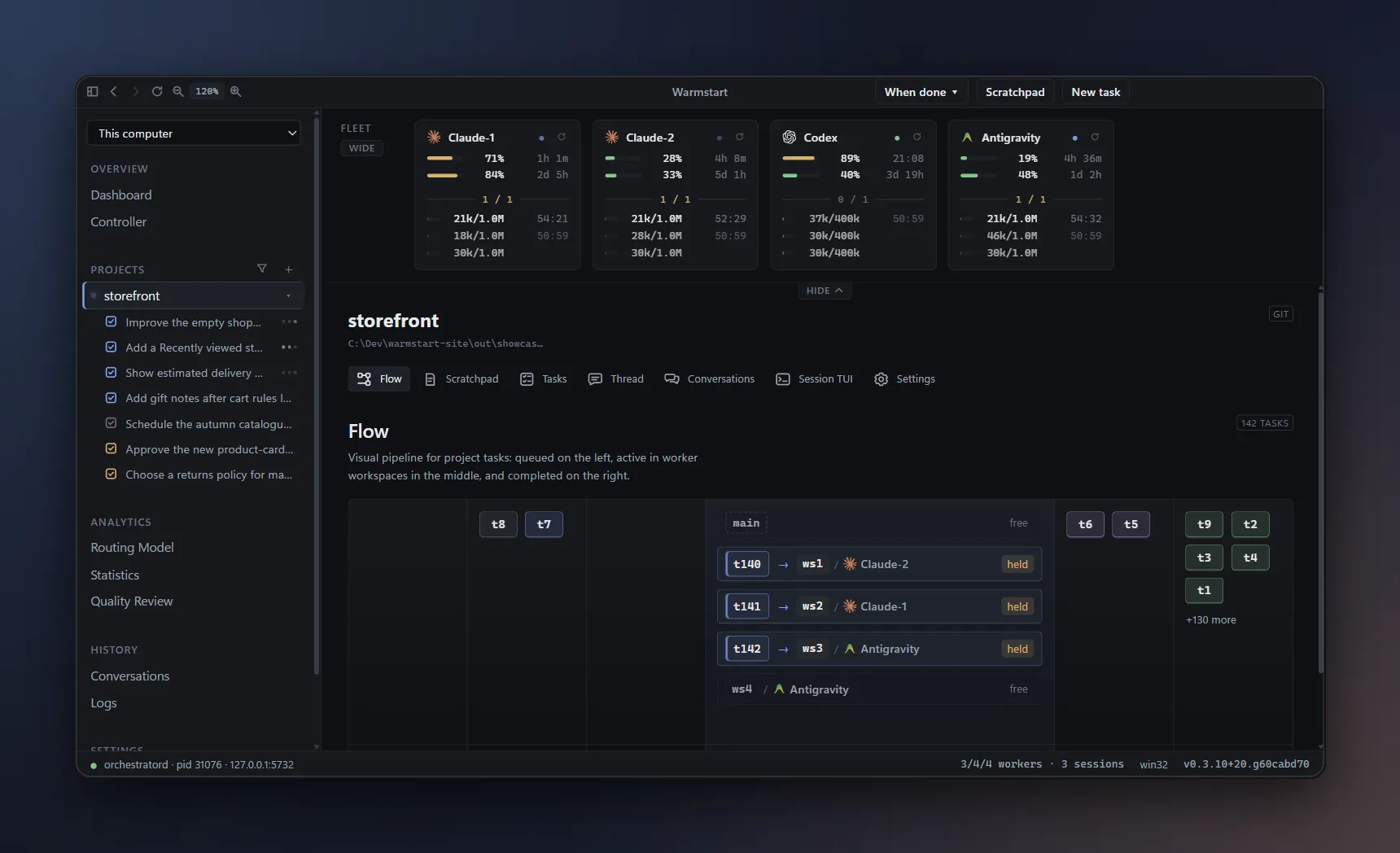
The empty shopping cart fix is independent, so I file it separately. Notice where it goes. Both Claude accounts are busy, and Codex has used eighty-nine percent of its five-hour window, close to the gate where Warmstart stops starting new work. So the task goes to Antigravity, which has the most room. Back on Tasks, I can see all three jobs running side by side, each with its own assignment and thread. Under each running task, one line shows what its agent is doing right now, so I can follow progress without opening every task. Flow shows how tasks share the workspace pool. Each job uses a separate checkout and branch, so their edits stay apart until integration. If one task needs another's result, I give it a dependency instead of hoping the order works out.
I open the recently viewed task to read the agent's progress. The agent asks a concrete question: should this history stay in the current browser session, or follow a signed-in customer across devices? I choose the session-only approach for this change. The answer and the work stay together in the task thread. I can also open Scratchpad beside the conversation to capture a follow-up without interrupting it. A future cross-device version belongs in a separate note. The current task keeps its scope, while the next idea is already saved.
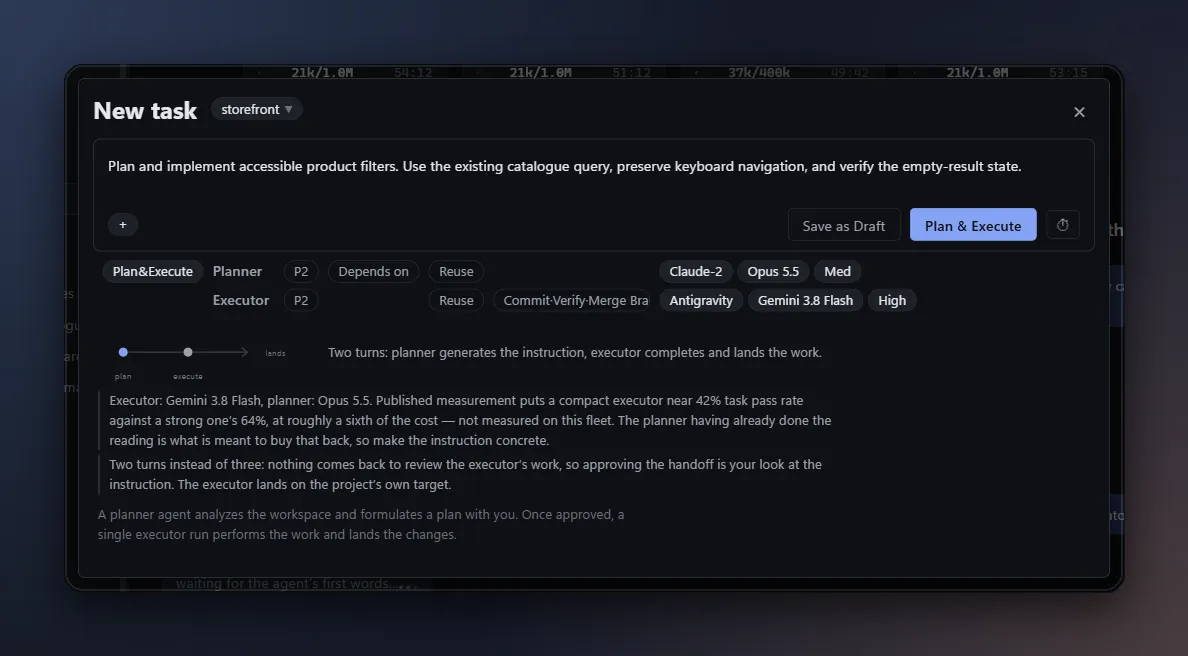
For a larger but bounded change, I choose Plan and Execute. Here the prompt asks for accessible product filters, with a plan before the change. The composer has two rows, a planner and an executor, and each one can have its own worker and model. I put the planner on Claude-2, with Opus 5.5 at medium effort, and the executor on Antigravity, with Gemini 3.8 Flash at high effort. The stronger model reasons once and writes a concrete instruction. The faster, lighter model then does the longer implementation turn, as a focused task. Two different agents work on one task, and Warmstart carries the handoff between them. This suits work that needs thought up front, but not several branches. Planning adds a stage, so a small obvious fix can stay a Single Task.
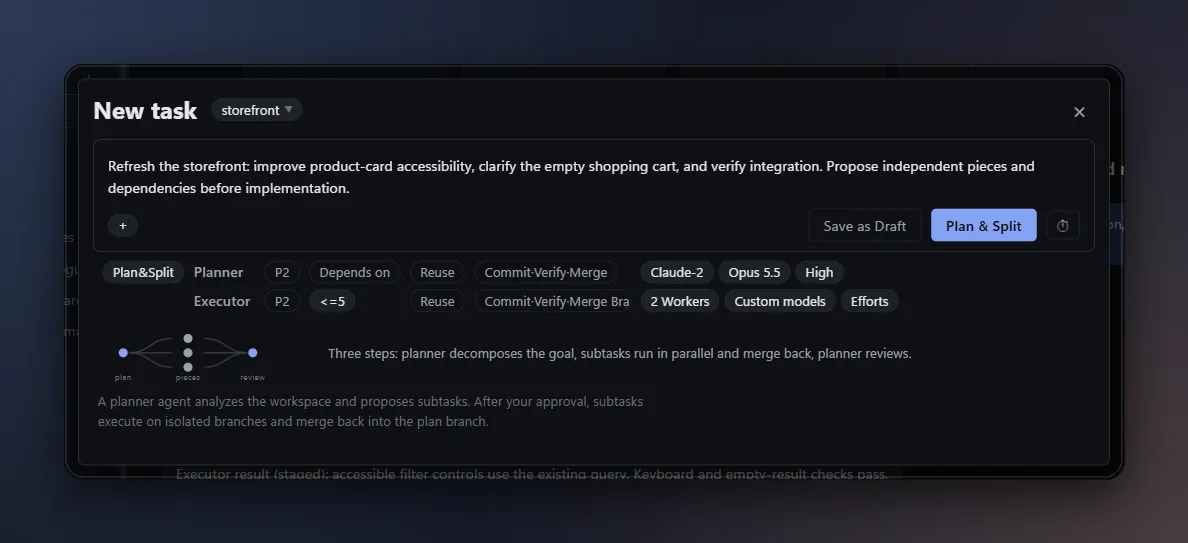
Now imagine a storefront refresh with independent pieces: product-card accessibility, the empty shopping cart, and integration checks. I choose Plan and Split. Again, I choose a model for each role. Opus 5.5 at high effort, on Claude-2, plans the pieces and integrates them at the end. The pieces are well specified, so they can run on lighter models: GPT-5.6 Terra on Codex, and Gemini 3.8 Flash on Antigravity. The strongest model spends quota only where judgment matters. The planner proposes the pieces and their dependencies, and asks for approval as a question. Meanwhile, the Codex five-hour window has reset, and its usage is back to a few percent. Nobody had to touch it; the capacity came back on schedule. I review the scope and click Approve. The pieces run in parallel, one on Codex and one on Antigravity, each on its own branch. The planner returns to integrate the results when the pieces settle. Splitting works best when the boundaries are clear, and integration costs less than the time saved by running in parallel.
Reusing a conversation is another way Warmstart saves tokens. Every new agent session first reads the project's instructions, skills, and layout. Measured with Claude Code, that setup alone costs about forty-one thousand tokens, even in an empty directory. The delivery-dates task finished earlier on Claude-2, and its conversation already holds the shipping rules. I file a follow-up: show the same estimate in the order confirmation email. Reuse is on, so when the follow-up goes to Claude-2, with the same model and effort, in the same workspace, Warmstart reopens that conversation instead of starting a new one. The session reads reused, and the setup is read back from the prompt cache, at about a tenth of the normal input price, instead of being built again. The new agent is told that the earlier context belongs to another task, and to re-read any file it relies on. The Conversations page shows that this conversation has now served two tasks. Reuse never crosses a project or an account, and a project can turn it off.
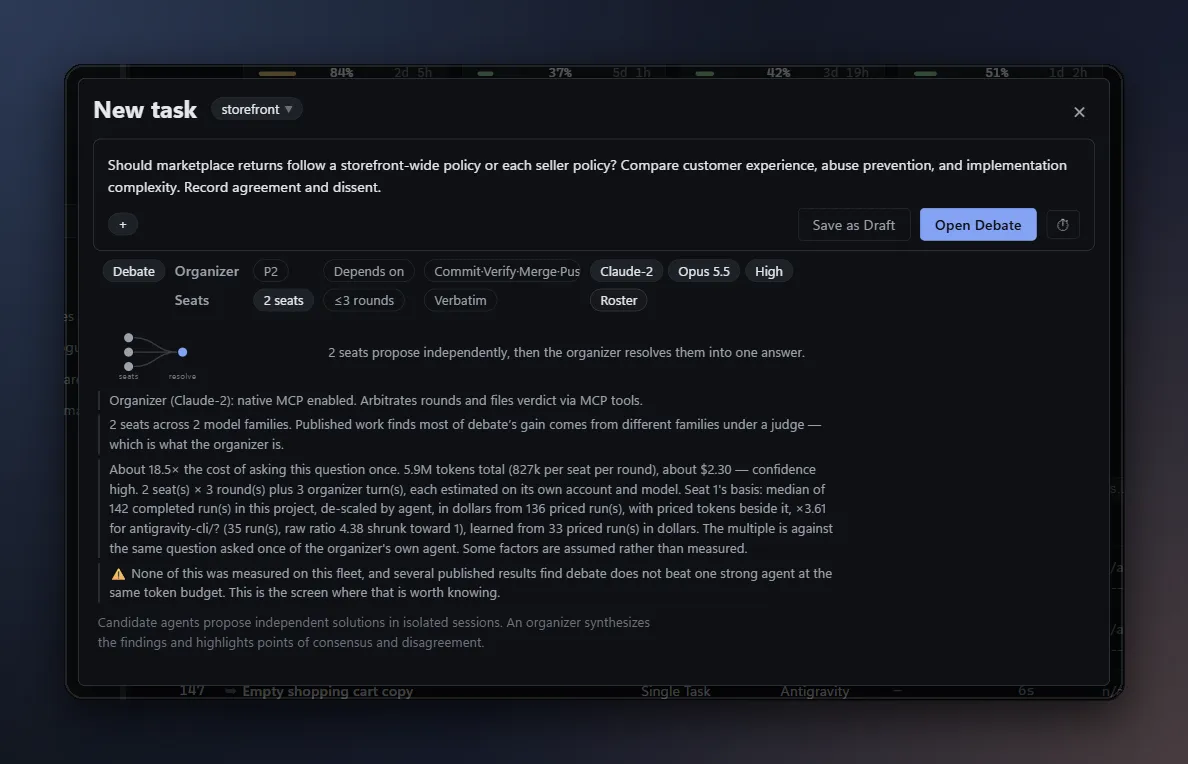
Some questions need more than one point of view before anyone edits code. Debate works like a design review with a few engineers who each see the problem differently. For the returns policy, I choose Debate. I configure the seats in the composer: different agents, each with its own lens, such as customer experience and seller operations. Each participant first answers independently, so nobody anchors on the first opinion. Then the organizer exchanges the positions, and each participant can respond to what the others raised. One model often notices what another overlooked, like an abuse case or a hidden implementation cost. As the positions converge, the synthesis keeps the main plan and folds in the smaller points worth keeping, and the output still records the disagreement that remains. That is why a debated design usually comes out stronger than any single answer. Once the direction is clear, I can file the work with explicit acceptance criteria.
Let's return to the recently viewed task, running on Claude-1. Its five-hour window has reached ninety percent, close to the gate, and the thread shows a preemption warning. The countdown gives me time to choose what happens when it ends. Because this is Claude Code, the first option is Compact and pause. Compacting asks the agent to summarize its own conversation into a much shorter context, like running slash compact. The session survives, smaller, and continues on this account after the quota resets. Hand off and pause instead commits safe work, writes a handoff brief, and ends the session; the next run starts fresh from that brief. Hand off and reassign prepares the same work for another eligible account. These controls manage accounts I am authorized to use; they do not make a provider's rate limit disappear.
Which choice is better depends on the reset time. Here, the Claude-1 five-hour window resets in eighteen minutes, so waiting is cheap, and I keep Compact and pause. The session is compacted and parked against that reset time, and its thread keeps the saved work. When the window resets and the account is eligible again, Warmstart puts the task back into the queue and resumes it automatically, with its compacted context. In this demonstration, we stage the reset instead of sitting through the real wait. The five-hour bar drops back down, and the task continues on the same account.
Later, the same account reaches ninety-seven percent of its weekly window, and that window does not reset for two more days. Waiting that long is not worth it, so I move the parked task instead. A compacted context belongs to the session that built it, so moving to another account always uses a handoff. Antigravity has plenty of room in both of its windows. I pick another worker in the pills below the reply box, review the model and effort, and press Reassign. Here I ask the next worker to finish the empty-state tests from the existing handoff. The task keeps its thread and saved changes while the next run uses the new assignment. Antigravity has never seen this task, so its first prompt carries the whole story: the task's goal, the handoff, and the earlier turns of this thread, marked as context rather than new instructions. The prompt chip shows how much it was sent. Several accounts make this an easy choice, but the destination still needs capacity and the right capabilities. A handoff carries context forward; it does not reuse the first provider's prompt cache.
Finally, I inspect the completed task. The thread records the change, the checks, and the landing result. Delivery follows the project's finish policy: it can leave committed work for review, merge locally, or use another configured delivery path. The board gives me a place to see what finished and what still needs a decision. Statistics records measured cost, duration, and peer review when those measurements are available. Subscription cost is a derived share of capacity, and unknown pricing stays unpriced. From a note to a task, from parallel work to a handoff, Warmstart keeps the decisions and the result in one place.
Start with a note. Choose a task type when it is ready. Stay close enough to steer, without managing a pile of terminals.
Jot down a prompt in Scratchpad while other work continues. Edit the Markdown, preview it, and file it when the outcome is clear.
Open the composer from your note. Choose how the task runs and let Warmstart assign an eligible worker and model.
Run independent tasks in separate worktrees. Answer questions in their threads, and save the next idea beside the conversation.
See the checks, the saved changes, and the delivery result. Anything that still needs your decision comes back to the board.
Warmstart assigns every task itself, weighing live capacity, cost, speed, and measured quality. You pick the task type and describe the work; it picks who does it.
Choose a single task, conversation, plan and execution, plan and split, or debate. Warmstart sets up the agents and handoffs.
Warmstart reads every account’s rolling quota windows and shows when each reading was taken. It holds work when an account cannot afford both the task and its active sessions.
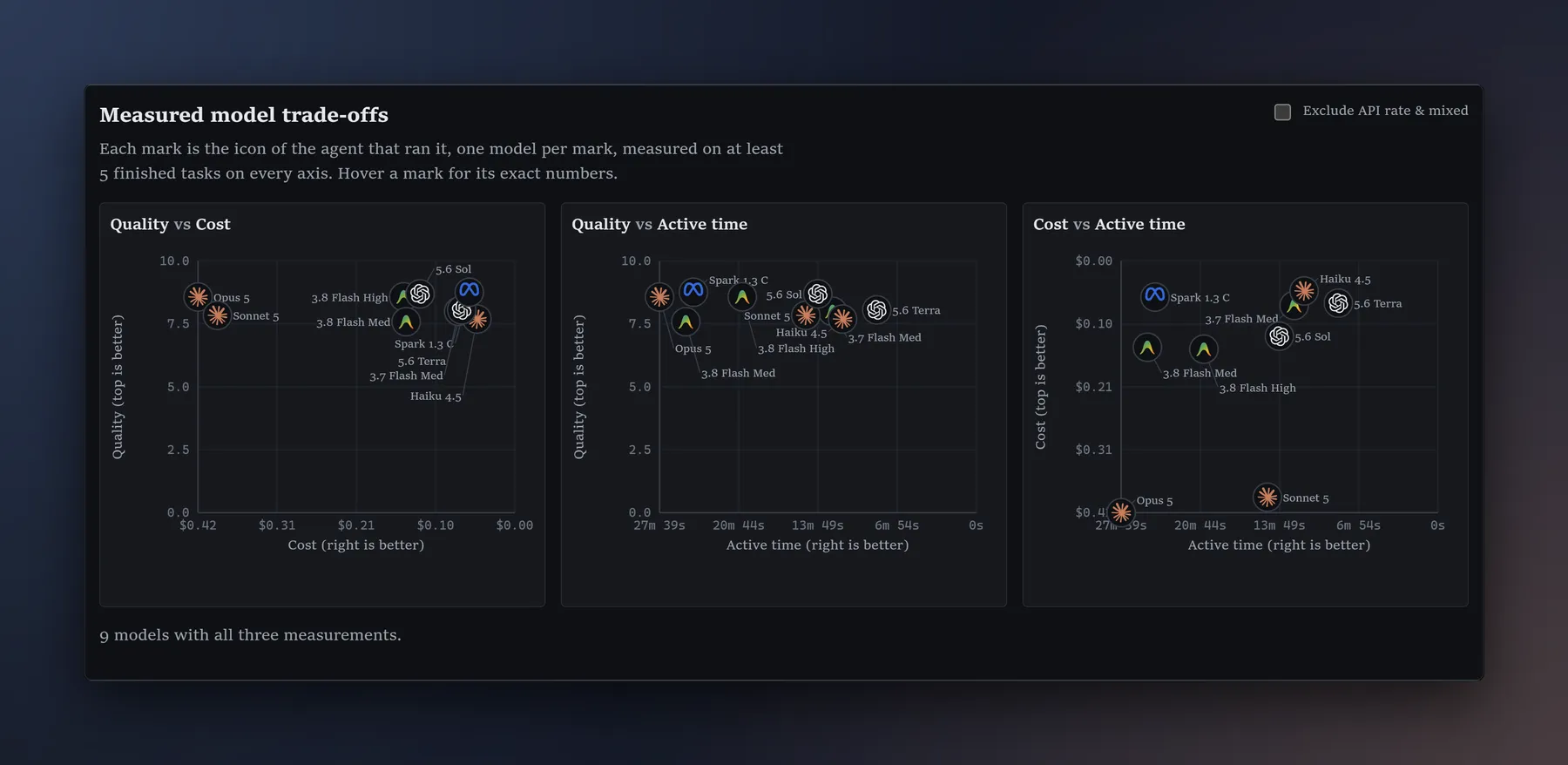
Warmstart scores each eligible account, model, and session on twelve terms, including cache age, saved context, time until reset, and past results. Missing measurements stay unknown instead of becoming guesses.
Every dispatch stores its score and arithmetic. Every finished task records the share of the subscription capacity it used.
Assignment model: Warmstart docs/routing.md candidate score terms, read 2026-10-10.
Task types: Warmstart task composer and docs/getting-started.md, read 2026-10-10.
Start with one agent, keep a conversation open, separate planning from execution, split work across several agents, or ask them to debate before you decide.
One autonomous turn, including landing the change. It can still stop and ask you a question.
Best for: Bugs, features and docs with a tangible outcome.
A thread you keep talking in. It stops after each turn and commits when you say so.
Best for: Ambiguous ideas, and anything you want to steer.
Agree on a plan, then hand a written instruction to one executor for a focused implementation run.
Best for: A strong model planning and a cheaper one implementing.
A planner files the pieces as dependent tasks, several agents implement them, and the planner integrates at the end.
Best for: Large work with real seams in it.
two to five seats answer independently; an organizer exchanges positions between rounds and reports agreement and dissent.
Best for: Design decisions that benefit from competing perspectives before implementation.
Starting over makes an agent reload its instructions, tools, and conversation. Warmstart resumes the session that already knows the work, while its prompt cache is still warm.
Good — resumed inside the cache window
99.8% fewer new prefix tokens
Resuming created only 65 new prefix tokens instead of rebuilding 41,542, read back at 0.1× of base price.
Bad — resumed after the cache expires
2.0× of base price to rebuild
None of the 41,542 prefix tokens survive. The next turn pays 2.0× of base price to rewrite them, instead of the 0.1× cache-read price the good case pays.
When the conversation gets too large, Warmstart can compact it into a smaller summary before continuing. That decision is based on 118 measured compactions.
Sources: local Claude CLI cold/resume experiment, 2026-08-28; Warmstart docs/cost-model.md historical local compaction sample, read 2026-10-10; Anthropic prompt-caching documentation, read 2026-08-24. Vendor prices and cache behavior differ.
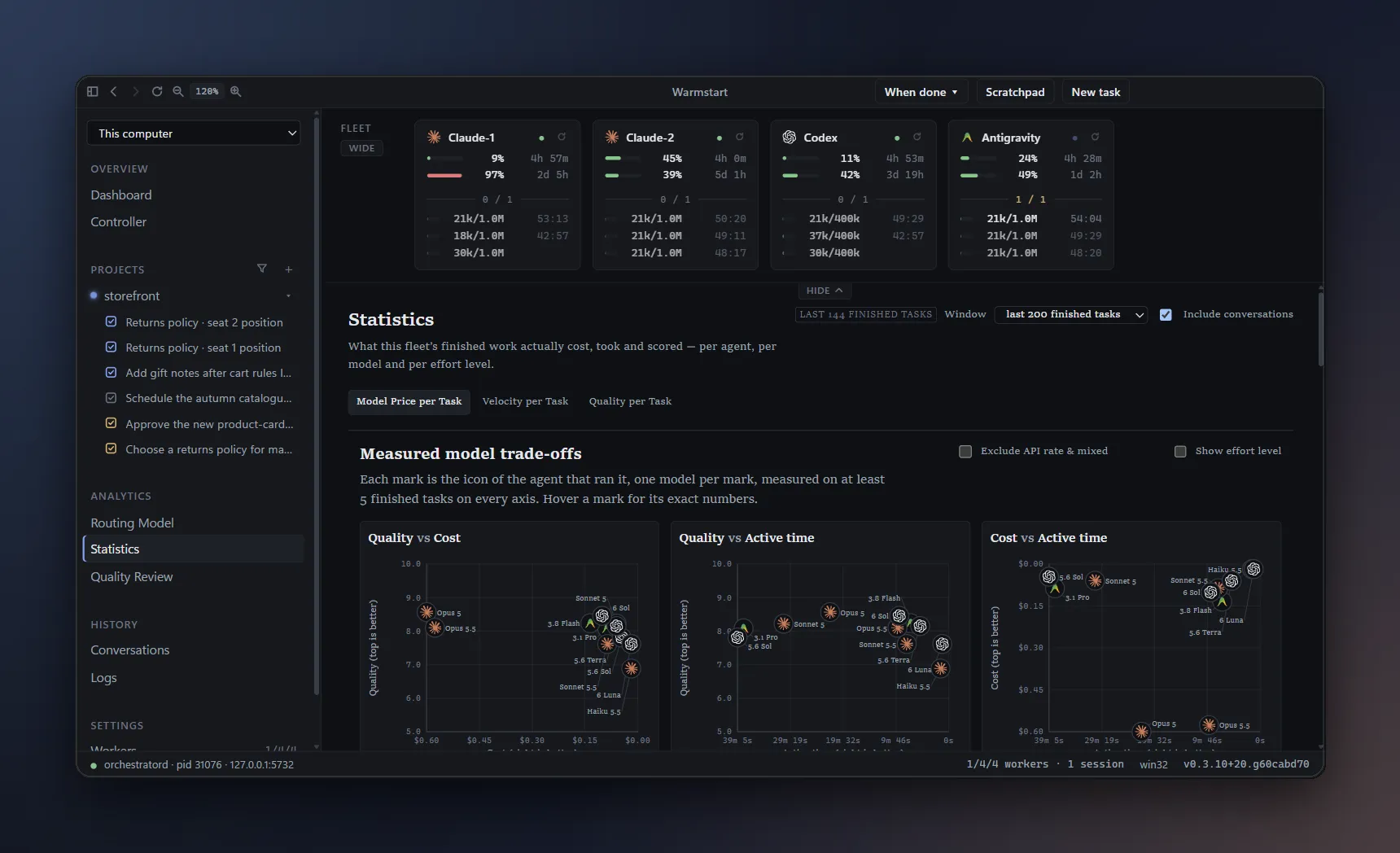
unpriced when a price cannot be measured. current Warmstart UI, app commit 60cabd70, captured 2026-10-11 Pacific; invented accounts and staged activity.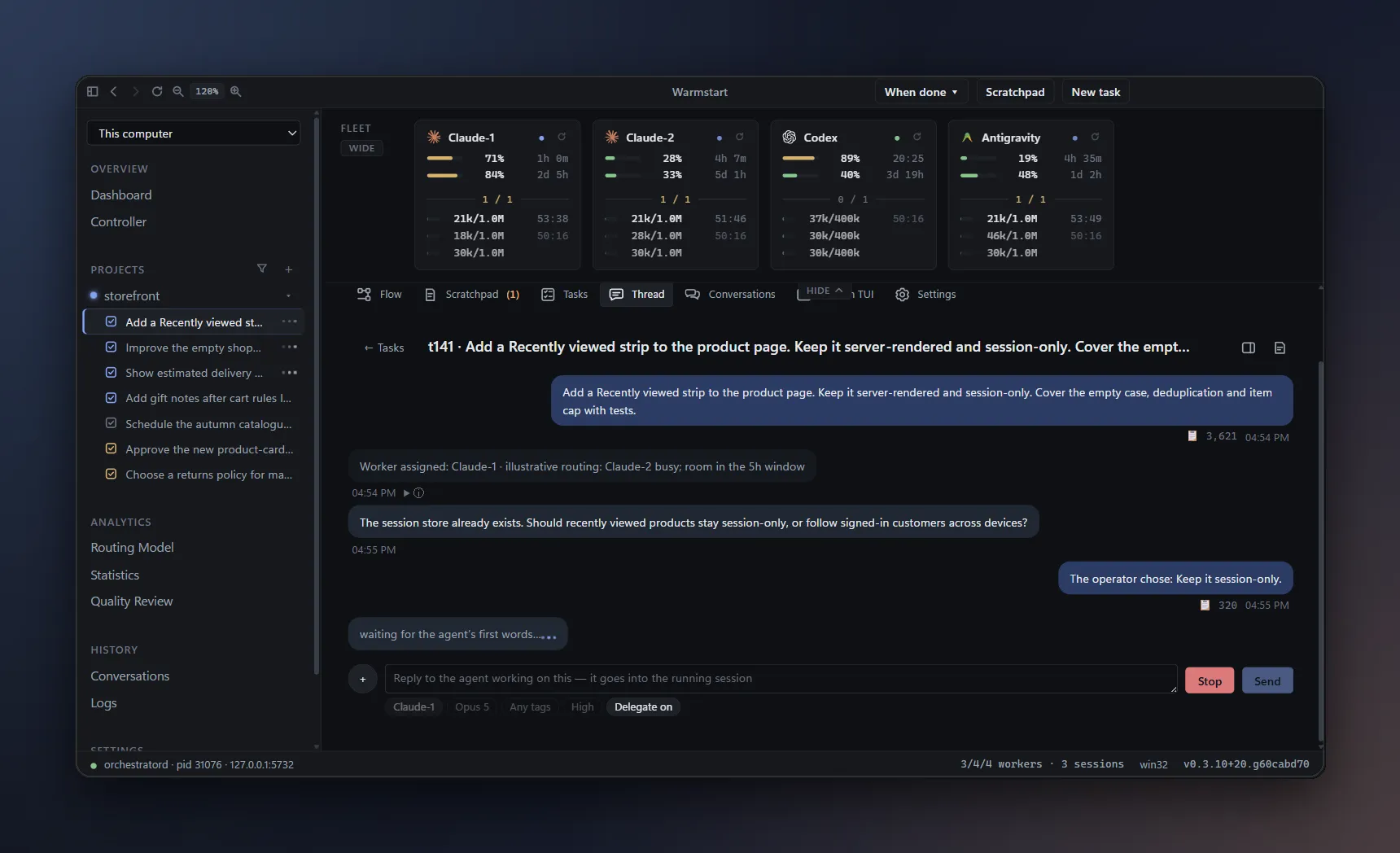
Each task gets its own branch and git worktree. Add dependencies, schedules, and priorities, or reserve the trunk for work that must run there.
See every account’s rolling windows, reading age, reset time, and live sessions. Hold an account out without signing it out.
Every prompt becomes a tracked task with a status, worker, model, branch, duration, and price. Questions, approvals, holds, and finished diffs return to the same board.
A quota preemption keeps the task and its handoff. Wait for automatic resume after reset, or choose another eligible worker and continue the same thread.
A peer agent from a different vendor grades finished work against a fixed rubric. The score informs future assignments but never blocks a candidate by itself.
Pair a phone by QR code to check quota, answer requests, and file tasks. Pair another desktop over Tailscale to control its fleet.
Warmstart never commits on an agent’s behalf. Cancel keeps the work. Anything that cannot land stays under Loose ends until you decide what to do.
| CLI | Signed in with | Accounts per machine |
|---|---|---|
| Claude Code | Claude Pro, Max or Team | Unlimited |
| Codex | Any ChatGPT plan, or an API key | Unlimited |
| Antigravity | Google AI Pro or Ultra | One per machine (OS keyring) |
Provider capabilities: Warmstart README.md provider capabilities, read 2026-10-10.
The preemption warning lets you choose what happens next. Hand off and pause saves safe work and a brief, then waits for the account’s quota reset. Hand off and reassign prepares that continuation for another eligible account.
Best when the window resets soon. The fleet strip shows each account’s 5h and weekly usage and when each resets. The task stays parked with its resume time and saved state. When the reset arrives and the account is eligible, Warmstart queues it again automatically.
Best when the reset is days away and another account has room. For a parked task, choose a worker, model, and effort below the reply box, then press Reassign. Your message goes with it. The same thread carries the handoff and existing changes.
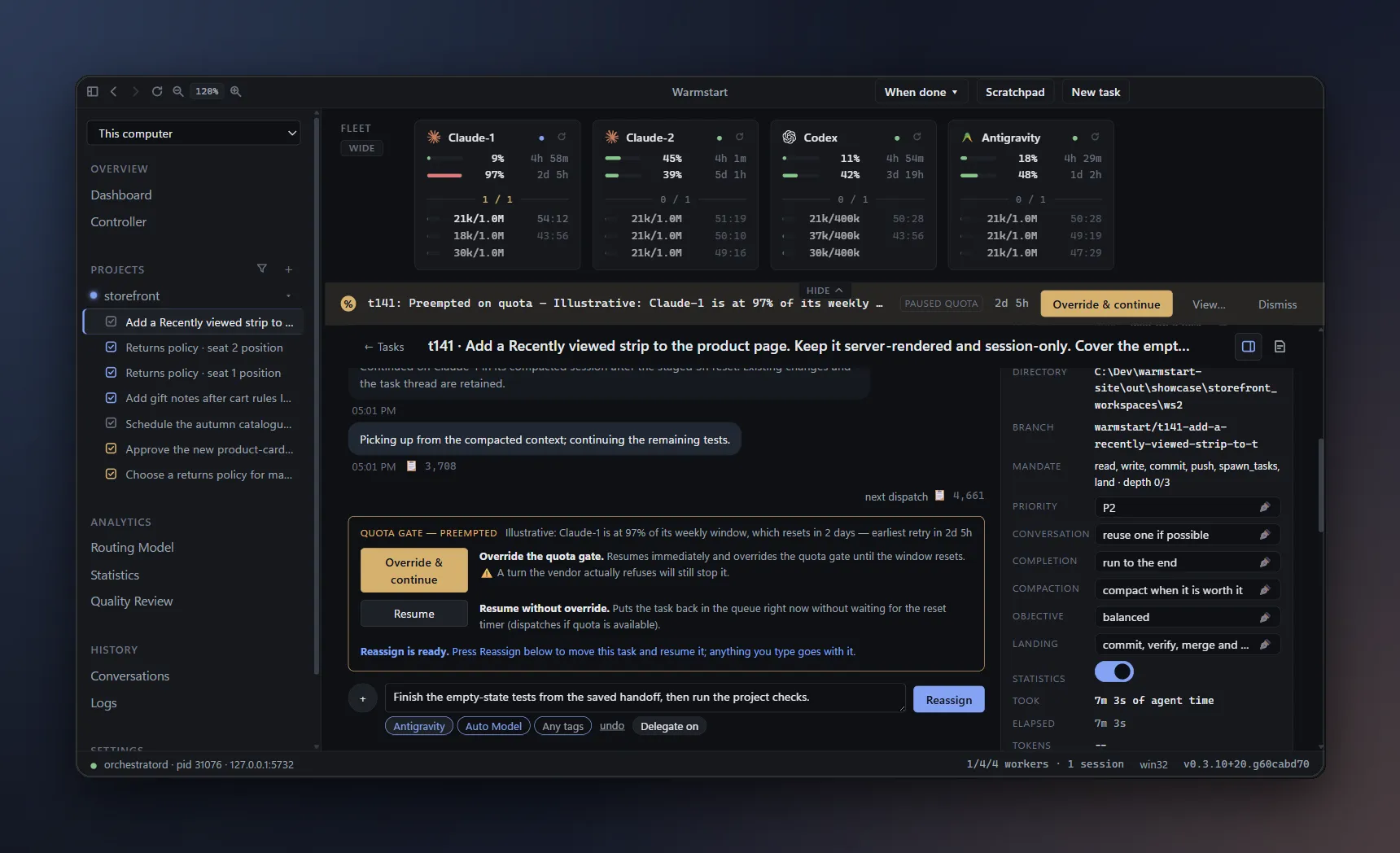
A handoff preserves the task’s record and saved work. Prompt caches belong to their providers; changing providers does not transfer that cache.
Planned work that is not available yet.
Warmstart adds automatic assignment and accounting to parallel agents and worktrees. It chooses where each task runs from live quota, warm context, reset timing, and your cost, speed, and quality priorities. It also records what each finished task consumed.
Warmstart launches each vendor’s own CLI and opens that CLI’s login flow in an embedded terminal. It does not read, store, copy, or proxy your credentials, and it does not obtain OAuth tokens or make model API calls on your behalf. Each account uses a separate isolation directory.
Warmstart reads the usage figures each CLI publishes and holds work when an account lacks capacity. If a reading is too old to trust, Warmstart reports unknown instead of showing a stale number.
You remain responsible for using accounts you are separately and legitimately subscribed to and entitled to use. Warmstart does not create accounts and does not share them between people — and it refuses to commission a second Antigravity account on one machine rather than let two workers quietly share one credential in the OS keyring.
Your provider’s current terms govern how you use each account. Warmstart does not make a determination about permission under those terms.
Warmstart estimates the share of subscription capacity a run consumed from quota readings, applies that share to the plan price, and adds any measured overage. This is derived data, not an invoice. If it cannot calculate a price, Warmstart reports unpriced.
Claude Code and Antigravity tasks run with permission prompts bypassed, as your OS user: a task can read and write anything you can, and reach the network. The worktree is where an agent is pointed, not a wall around it. Codex runs in its native sandbox by default. Set a Codex account to sandboxed only to hold work that cannot run with that boundary.
Warmstart limits what a task may ask the fleet to do, gates landing on your checks and decision, separates account credentials, and restricts each CLI’s environment. These controls do not turn the worktree into a security boundary.
No. Warmstart is built for subscription CLIs you are already signed in to. Codex can also use an API key if that is how you pay for it.
Nothing. Warmstart is open source under the Apache-2.0 licence. You pay your providers, as you do today.
Warmstart is pre-alpha. It is used every day, and it will still surprise you.
| Platform | State | Notes |
|---|---|---|
| Windows | Used every day | Installer is unsigned at first; SmartScreen will ask you to confirm. |
| macOS | Signed and notarised | Apple Silicon and Intel builds have driven real agents. |
| Linux | Not supported | Builds in CI; never run against a real agent. |
Platform status: Warmstart README.md, read 2026-10-10.